— — — —— — —
×
— —— —
New Anlist users often have questions about how to format text, use links, and so forth. This guide attempts to document just about everything you could ever need to know, so that all of these tips and tricks are explained in one place.
Feel free to suggest changes, or to share/modify this guide as you wish.
Formatting is based on Markdown, though with a few Anilist-specific quirks such as spoilers or Youtube video embeds. For this reason, I've referred to it as "Anilist-Flavored" Markdown in this guide, like the GitHub Flavored Markdown used by GitHub, or Reddit Flavored Markdown at Reddit.
Unlike the Original Markdown, newlines "just work" without any messing around. For example, this text:
Hello
world
...will appear as two separate lines, like you'd expect, whereas it "ought to" appear as Hello world (on a single line) according to "original" Markdown.
Put one * or _ character either side of the text:
_hello_ becomes hello*world* becomes worldYou can also use the HTML <i>...</i> or <em>...</em> tags:
<i>hello</i> becomes hello<em>hello</em> becomes helloNote that there is currently a bug where _ doesn't work with less than three characters, so _1_ or _12_ won't work, but _123_ will.
Put two * or _ characters either side of the text:
__hello__ becomes hello**world** becomes worldYou can also use the HTML <b>...</b> or <strong>...</strong> tags:
<b>hello</b> becomes hello<strong>hello</strong> becomes helloThis can be combined with italics like so: _**hello world**_
Put two ~ characters either side of the text:
~~hello~~ becomes helloYou can also use the HTML <del>...</del> or <strike>...</strike> tags:
<del>hello</del> becomes hello<strike>hello</strike> becomes helloAgain, this can be combined with bold or italic text: ~~**hello** _world_~~
To center-align text, surround it with either ˜˜˜...˜˜˜ or `
...
`:
hello world
For centred, right-aligned, or "justified" text, add align="???" to the HTML <p>...</p> or <div>...</div> tags:
<p align="left">This is kind of pointless...</p>

<p align="center">This is equivalent to the other methods.</p>

<p align="right">This aligns the text to the right.</p>

<p align="justify">This gives you "non-ragged" paragraphs of text.</p>
Note that these all rely on HTML4 features, and so may stop working one day...
Begin each line with a > character, or use <blockquote>...</blockquote>:
> hello
> world

<blockquote>hello
world</blockquote>
...becomes:
hello
world
You can "nest" quotes by adding extra > characters, like so:
> hello
>> world
...becomes:
hello
world
Note that quoted text will always appear italic due to Anilist styling.
Link to other pages using [the text you see](https://anilist.co/). This will open in a new tab when clicked.
You can also use <a href="https://anilist.co">the text you see</a> HTML, but this will not open in a new tab unless you add target="_blank" (possibly a bug; may change in the future).
Simple links will "just work", and may optionally be surrounded with < and > like so:
https://www.google.com

<https://www.google.com>
As a special case, links to anime/manga pages on Anilist will show a preview:
https://anilist.co/anime/66/Azumanga-Daioh/

https://anilist.co/manga/30085/Azumanga-Daioh/
https://anilist.co/anime/66/Azumanga-Daioh/
https://anilist.co/manga/30085/Azumanga-Daioh/
Images look like links, but with a ! in front:

You can also use HTML:
<img alt="fallback text" src="https://anilist.co/img/icons/icon.svg">
There's also an (Anilist-specific) way to specify a size:
img###(https://anilist.co/img/icons/icon.svg)
...where ### is the width in pixels, such as 420.
Note that the img code is always converted (even within code blocks) so be careful when trying to explain how it works to other users!
Create a "header" by starting the line with 1-5 # characters:
# Bigger

## Normal

### Smaller

#### Smaller still

##### Even smaller
Result:
You can also use the HTML <h1>/<h2>/<h3>/<h4>/<h5> tags, but Anilist doesn't allow the <h6> tag (so ###### this or <h6>this</h6> won't work).
Alternatively, you can use == or -- instead of # text or ## text:
Hello
==

World
--
Use as many = or - characters as you like, but there must be at least two.
Enter three or more - or * characters, optionally with spaces:
---

***

- - -

* * *
Make sure to have a blank line either side to avoid ambiguity:
this is a header
---

this is text followed by a horizontal line

---
Alternatively, you can use the <hr> HTML tag.
For bullet-point lists, simply start each line with -, *, or +:
- hello
- world

* hello
* world

+ hello
+ world
All of these become:
For numbered lists, simply begin each line with 1., 2., etc.
1. hello
2. world
This becomes:
Note that you don't actually have to use sequential numbers. For example:
6. ALL
6. HAIL
6. SATAN
...becomes:
For sub-lists, simply indent each point by two spaces:
+ hello
  + world
    + hello
      + world
You can also mix-and-match numbered and bulleted lists:
* hello
  1. world
    + hello
    + world
  2. hello
* world
Alternatively, you could use the HTML <ul>/<ol>/<li> tags instead.
For "inline" code, use backticks:
blah blah `markdown **does
not** work here` blah blah
If you use the HTML <code>...</code> tag, you can use Markdown in your code, so it essentially acts as a monospaced-text effect:
blah blah <code>markdown **works
fine** here</code> blah blah
For "blocks" of code, simply prefix each line with four spaces:
normal **markdown** text

    some(code) { markdown(wont**work**here) }

more _normal_ text
... or surround it with triple-backticks:
normal **markdown** text

```
some(code) { markdown(wont**work**here) }
```

more _normal_ text
You can also use the HTML <pre>...</pre> tag:
normal **markdown** text

<pre>
some(code) { markdown(wont**work**here) }
</pre>

more _normal_ text
Most of the things above will work on any Markdown website, but this section covers things that are specific to Anilist.
Note that most or all of these will always be converted, even if they're put inside code blocks!
Surround text you want to hide with ~!...!~ like so:
some spoiler text
Using <div rel="spoiler">some spoiler text</div> also works for now, but this might not be the case in the future - stick with the Markdown approach!
Note that the spoiler text feature has a few bugs at the moment:
~!...!~ is converted even in code blocks, so it can be difficult to explain how it works to other users.˜˜˜...˜˜˜ or `...
`; it puts the "hidden" text after the Spoiler, click to view block.
Hopefully, these will be fixed in the future, but for now, be careful to avoid unintentionally revealing spoilers to other users!
Surround the URL with youtube(...) like so:
youtube(https://www.youtube.com/watch?v=D0q0QeQbw9U)
Note that only the D0q0QeQbw9U part is actually required:
Again, this is always converted - even in code blocks.
Surround the URL with webm(...) like so:
webm(https://files.kiniro.uk/video/sonic.webm)
These embeds will play (and loop) automatically, and are muted by default:
Note that, despite the name, any audio or video file will work - but may not actually be supported by all browsers.
PS: Does not interact well with code blocks.
This section covers a few things to be aware of if you want to post emojis (or other non-ASCII characters) on Anilist.
Run everything through this before you post on Anilist and you should be fine.
Any Unicode character whose "code point" is more than 65535 (FFFF hexadecimal) will cause the rest of your post to be "cut off" and disappear, because, well, MySQL. Unfortunately, this includes (almost) all emojis, plus various other "unusual" Unicode characters.
Using HTML magic, you can "manually" include these characters like so:
🤔 = 🤔 (decimal) or 🤔 (hexadecimal)
The Unicodifier does this for you, converting any code-points over 65535 into &#this; format so that they won't cause problems when you post them on the Anilist website.
This section covers a few odds and ends which sometimes get asked about on the global feed.
To have an image take you somewhere when you click on it, simply wrap it in an ordinary Markdown link:
[ img###(https://anilist.co/img/icons/icon.svg) ](https://anilist.co/)
Note that the spaces around the img code are necessary in order for it to be converted properly. However, this isn't the case with "basic" Markdown images:
[](https://anilist.co/)
A few people have colored (non-link) text on their profile pages. This is done via a HTML link that doesn't specify a URL: blah <a>hello world</a> blah
You can change the font-styling of your text through the magic of Unicode. See https://yaytext.com for examples, but remember to run everything through the Unicodifier before you post it!
Embedded images are automatically converted to https:// if they start with a plain http:// prefix.
If you embed an image in a post and it doesn't seem to appear, check that it's coming from a website that supports secure (HTTPS) URLs.
If you want to use an asterisk/underscore/etc. without it being used to format your text, simply prefix it with a backslash:
\*hello world\* becomes *hello world*\_hello world\_ becomes _hello world_Use two backslashes to get a single backslash.
Alternatively, use HTML character-entity references (like & or () instead of & or ( to get literal characters.
Not possible, as far as I'm aware - the <u>...</u> HTML tag is currently not allowed by Anilist.

Nice, gonna stash this away in my bookmarks

Thanks! This is really helpful! Alternatively, you can also make horizontal lines by typing <hr>

and you can use width and align attribute too
<hr width=25% align=left>
<hr width=25% align=center>
<hr width=25% align=right>

Wow, that's a cool one! I was wondering how people were doing that. If they were just hacking it with alignment/padding tricks or something else.

WOW ! This forum post is amazing !
@GoBusto;
You're awesome !
I wanted add Anilist's markdown system to my forum post about AL's features but I think that won't be needed now since you have already created a forum about it way better than I could ever hope to present.

If only I had this when I first came onto Anilist and was using the forums. This would have been so helpful!
But if I have one question: When changing the text to have a certain color without making the use of a link, is it possible to choose the specific color through altering the coding?

There appears to be a bug with this, as seen here:
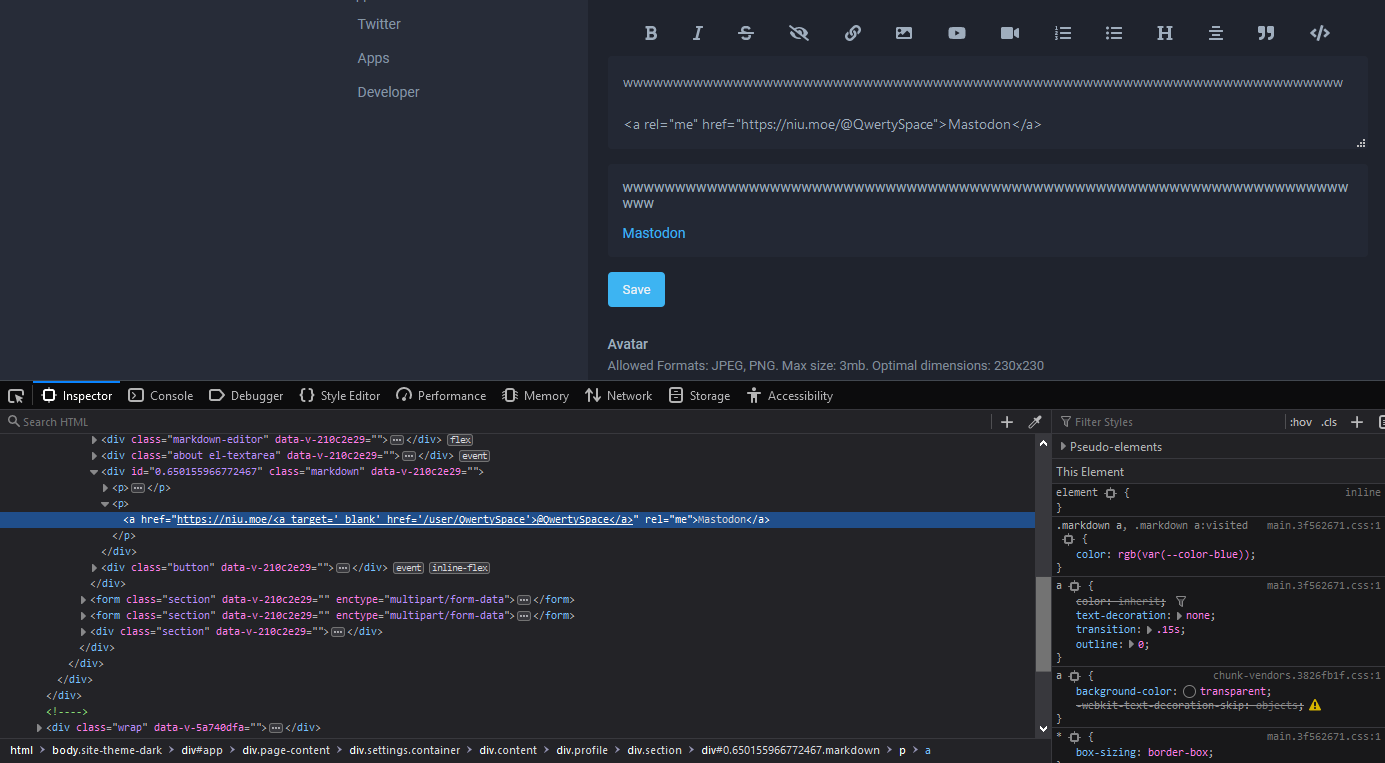
You can get around it replacing @ with @

Super helpful been looking for a guide like this thanks so much!

Thanks!!

If your link has paranthesis, you must escape the last one with its URL entity, which is %29
https://en.wikipedia.org/wiki/Nausica%C3%A4_of_the_Valley_of_the_Wind_(film)
As named link:
[Nausicaä wikipedia page](https://en.wikipedia.org/wiki/Nausica%C3%A4_of_the_Valley_of_the_Wind_(film%29)
[Nausicaä wikipedia page](https://en.wikipedia.org/wiki/Nausicaä_of_the_Valley_of_the_Wind_(film))

This is the best. Thank you so much for the effort. It is truly appreciated.

Why Can't I add a symbol like heart when i tried to it comes a question mark

short answer: https://files.kiniro.uk/unicodifier.html
Thanks

is it possible to put emotes in the anime "notes" ?

Thanks so much, anilist is very different than MAL in this aspect. Is there a way to add a video as a spoiler? when I try it never works.
do you mean a youtube video?
~!youtube(https://www.youtube.com/watch?v=o6TnYl44qPQ)!~
...or a non-youtube one?
~!webm(https://files.kiniro.uk/video/hasuki.webm)!~
(note that spoilers, youtube embeds, and .webm videos are all Anilist "extensions" which run after the actual Markdown parser processes things, so they tend to be a bit buggy; you may run into problems with them in specific circumstances, even if the "general" examples above work OK.)
Sorry for all the questions, but how do I make a spoiler that includes multiple lines of videos, there are YouTube links on different lines and I want them all to be under the same spoiler.
Mod Edit:

this is great
Fun thing I learned is '+' is also a valid centering character:
~~~Centered text tilde~~~
+++Centered text plus+++
Both produce:
Centered text tilde
+++Centered text plus+++
This allows for more compact spoiler centering over tildes:
~~~ ~!Centered Spoiler text tilde!~ ~~~
+++~!Centered Spoiler text plus!~+++
Both produce:
Centered Spoiler text tilde
+++Centered Spoiler text plus+++
As an aside, triple pluses are incredibly obnoxious to escape. The only reason I discovered this centering method is because they were breaking a post I was writing and I had to figure out why. Plus centering happens very late in the markdown conversion process.
Backslash escape: No \+\+\+
HTML entity: Still no +
Zero width joiner: Yes +‍+‍+

it's more comfortable for me to reach the plus sign with my right hand then tilde with my left, thanks!
If you want to escape AniList-specific Markdown syntax:
‍ is your most powerful ally. It breaks up almost anything and doesn't produce any characters (visually). This allows others to cleanly copy and try out a syntax, without any extra steps. (I was wrong about this).
("zwj" stands for Zero-width joiner, which hopefully makes it easier to remember)
img‍(https://image.url)
img(https://image.url)
img‍220(https://image.url)
img220(https://image.url)
img‍30%(https://image.url)
img30%(https://image.url)
webm‍(https://media.url)
webm(https://media.url)
youtube‍(https://youtu.be/video)
youtube(https://youtu.be/video)
[https:‍//anilist.co/anime/154/Shaman-King](https://anilist.co/anime/154/Shaman-King)
https://anilist.co/anime/154/Shaman-King
~‍!Spoiler text!‍~
~!Spoiler text!~
~‍~‍~Center text tilde~‍~‍~
~~~Center text tilde~~~
+‍+‍+Center text plus+‍+‍+
+++Center text plus+++
@‍triggersegfault
@triggersegfault
The placement of ‍ isn't very important (with exception to URLs). Try playing around with the position and see for yourself.
This can be used for many other escapes, but a lot of standard Markdown syntaxes (i.e. bold, italic, strikethrough) are easier to escape with a backslash: '\'
<tag> </tag> <tag/>
<tag> </tag> <tag/>
https:‍//nocolor.url
https://nocolor.url
<a>https:‍//dummy.url</a>
https://dummy.url
&
&
&zwj;
‍
&lt; &gt;
< >
etc...

hey how would I use the anchor element in my profile?
https://developer.mozilla.org/en-US/docs/Web/HTML/Element/a See (Linking an element to the same page)
Linking to the same page works with a url of: #ID. Where ID is not something you really have much control over defining in AL markdown. Some markdown flavors create IDs for headers, like so:
## My Header
turns into...
<h2 id="my-header">My Header</h2>
so making a link like so...
<a href="#my-header">Go to My Header section</a>
may work.
AniList may do this, meaning you can link to headers.... but I'll need to check to confirm.
Test link: Go to video
EDIT: So AniList does not create IDs for headers. BUT they do create IDs for YouTube videos.
Here's an example.
<span class="youtube" id="cZWWbDU6HQs" style="background-image: url("https://i.ytimg.com/vi/cZWWbDU6HQs/hqdefault.jpg"); background-size: cover; background-position: center center; background-repeat: no-repeat no-repeat;"><span class="play"></span></span>
A YouTube video with the ID "cZWWbDU6HQs" can be navigated to with <a href="#cZWWbDU6HQs">Go to video</a>. This is quite a bit of a hack, and not really a useful technique, but you could potentially spoiler out the video or there may even be ways to hide it if you really want that navigation.
Thanks so much! That is really helpful
To clarify more on this, you'll have to use HTML links, the markdown links don't work since they open in a new tab.
youtube(https://youtu.be/cZWWbDU6HQs)
<a href="#cZWWbDU6HQs">Go to video</a>
More clarification on the webm(video) syntax and using other video/audio formats.
WebM isn't required by most browsers, but the video source type is still declared as WebM, as shown below:
<video muted="" loop="" controls="">
<source src="https://thumbs.gfycat.com/SlushyFluidEgg-mobile.mp4"
type="video/webm">
Your browser does not support the video tag.
</video>
Currently iOS browsers are the main ones struggling with this. The WebM format isn't currently supported, and iOS is one of the few browsers that does not automatically determine the real video format.
So in the future when WebM is finally supported, all other video/audio formats will still remain broken.